Artikel 18 Sep 2026, 02.01
Siapa yang Mengubah Dokumen Legal? Begini Cara Audit Trail Otomatis Membantu Melacaknya
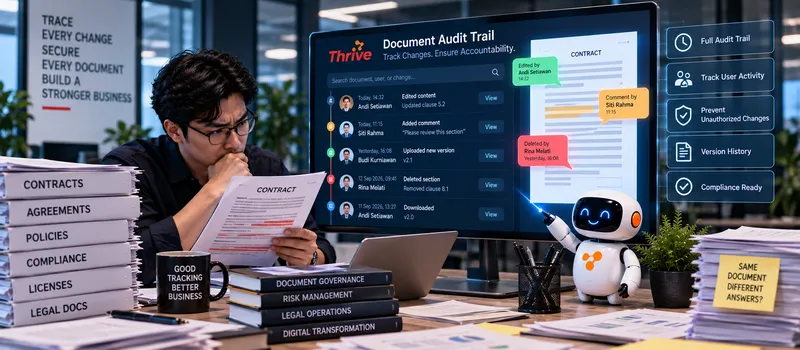
Semua Aktivitas Dokumen Bisa Dilacak?
AI Automation dapat membantu Legal mencatat dan melacak aktivitas dokumen secara otomatis, mulai dari dokumen dibuat, dibuka, diedit, dikirim untuk review, disetujui, hingga diarsipkan.
Setiap aktivitas dapat mencatat siapa, kapan, dokumen apa, dan tindakan yang dilakukan.
Perubahan versi dapat dilacak tanpa mengandalkan nama file seperti final_v2_revisi_final.pdf.
Aktivitas approval dapat direkam lengkap dengan timestamp.
Dokumen yang tidak aktif dalam proses tertentu dapat diberi status atau flag.
Riwayat dapat digunakan saat audit internal atau ketika terjadi dispute.
Dengan AI Automation, audit trail dapat menjadi bagian dari workflow dokumen, bukan pekerjaan tambahan yang harus dibuat manual setelah proses selesai.
Bagaimana Pelacakan Aktivitas Dokumen Bekerja?
Dalam proses Legal, satu kontrak bisa melewati banyak tangan. Ada requester, Legal reviewer, Procurement, Finance, hingga management.
Tanpa audit trail yang rapi, pertanyaan sederhana seperti “siapa yang mengubah klausul ini?” bisa membutuhkan pencarian email dan file secara manual.
Workflow yang dapat diterapkan:
Document Upload → Version Tracking → Review → Edit → Approval → Signature → Repository → Audit Log
1. Catat Setiap Aktivitas Penting
Dengan AI Automation, sistem dapat mencatat event seperti:
Upload → View → Edit → Comment → Submit → Approve → Reject → Download
Data log minimal dapat berisi:
User
Timestamp
Document ID
Action
Version
Status
Source system
Contohnya, kontrak CTR-2026-015 diedit oleh Legal pada pukul 14.32 dan kemudian dikirim ke Finance pada pukul 15.10. Riwayat tersebut dapat ditelusuri tanpa mencari percakapan satu per satu.
2. Bedakan Setiap Versi Dokumen
Perubahan dokumen legal perlu memiliki version control.
Misalnya:
Version 1.0 → Legal Review → Version 1.1 → Finance Review → Version 1.2 → Approved
Dengan AI Automation, perubahan status dan versi dapat tercatat secara otomatis.
Hal ini penting karena dokumen yang terlihat sama belum tentu memiliki isi yang sama.
Jika klausul liability berubah dari 100% menjadi 50%, reviewer perlu dapat mengetahui versi mana yang memuat perubahan tersebut.
3. Hubungkan Audit Trail dengan Approval
Audit trail akan lebih berguna jika terhubung langsung dengan approval workflow.
Contoh:
Contract Value Rp500 juta → Legal Review → Finance Approval → Director Approval
Dengan AI Automation, setiap approval dapat menghasilkan event baru di audit log.
Misalnya:
Finance Approved — 6 September 2026 — 10:15
Director Approved — 6 September 2026 — 13:40
Data tersebut membantu menunjukkan urutan proses secara jelas.
4. Deteksi Aktivitas yang Tidak Biasa
Audit trail juga bisa digunakan untuk mencari pola yang perlu diperiksa.
Misalnya satu user melakukan download terhadap 50 dokumen dalam waktu 10 menit, padahal biasanya hanya mengakses 3–5 dokumen per hari.
Dengan AI Automation, aktivitas tertentu dapat diberi flag berdasarkan rule yang ditentukan perusahaan.
Flag bukan berarti otomatis menyatakan terjadi pelanggaran. Legal atau security team tetap perlu melakukan pemeriksaan.
5. Buat Reporting dan Audit Lebih Cepat
Saat audit, Legal biasanya perlu menjawab:
Dokumen apa yang berubah? Siapa yang mengubah? Kapan dilakukan? Siapa yang menyetujui?
Dengan AI Automation, data audit trail dapat dikumpulkan berdasarkan Document ID, user, periode, jenis aktivitas, atau status approval.
Hasilnya bisa digunakan untuk reporting mingguan, bulanan, atau kebutuhan audit tertentu.
Apa yang Perlu Disiapkan?
Tentukan aktivitas yang wajib dicatat.
Gunakan unique Document ID.
Simpan timestamp setiap event.
Terapkan version control.
Catat user dan action.
Hubungkan approval dengan audit log.
Terapkan role-based access.
Pastikan log tidak mudah diubah oleh user biasa.
Tentukan retention period sesuai policy perusahaan.
Buat alert untuk aktivitas tertentu.
Uji dengan 20–50 dokumen sebelum rollout lebih luas.
Gunakan software legal untuk perusahaan dan software berlisensi resmi.
Audit trail yang baik bukan sekadar daftar aktivitas. Nilainya ada pada kemampuan untuk menjawab apa yang terjadi, kapan terjadi, siapa yang melakukan, dan versi dokumen mana yang terlibat.
FAQ
1. Apa saja yang sebaiknya dicatat dalam audit trail?
Minimal user, timestamp, Document ID, action, version, dan status.
2. Apakah audit trail bisa mencatat perubahan versi?
Bisa. AI Automation dapat digunakan untuk menghubungkan aktivitas dokumen dengan version control.
3. Apakah setiap aktivitas harus dianggap sebagai risiko?
Tidak. Aktivitas hanya menjadi data. Risk flag perlu dibuat berdasarkan rule atau pola yang memang dianggap penting.
4. Apakah audit trail bisa mencatat approval?
Bisa. Approval, rejection, timestamp, dan approver dapat dicatat sebagai bagian dari riwayat dokumen.
5. Berapa lama audit trail harus disimpan?
Tergantung kebijakan perusahaan, kebutuhan audit, jenis dokumen, dan aturan yang berlaku. Retention period sebaiknya ditentukan sejak awal.
6. Bisakah audit trail digunakan untuk investigasi?
Bisa. Riwayat aktivitas membantu menyusun kronologi perubahan dan menentukan user atau proses yang perlu diperiksa.
7. Apakah user biasa boleh menghapus audit log?
Sebaiknya tidak. Akses terhadap audit log perlu dibatasi dan dilindungi agar integritas catatan tetap terjaga.
8. Apakah audit trail bisa dibuat otomatis?
Bisa. AI Automation dapat menjadi bagian dari workflow untuk mencatat event, membuat flag, dan menghasilkan reporting secara otomatis.
Artikel Terkait
Baca Juga Informasi Menarik Lainnya dari Kami

Umum
5 Langkah Menciptakan Voucher Digital yang Sukses Menarik Pelanggan
Voucher digital telah menjadi alat pemasaran yang sangat efektif untuk menarik pelanggan, meningkatkan loyalitas, dan me...

Umum
Cerita Nyata: Startup Menggunakan Zoho CRM untuk Scale Up ke 3 Kota
Pertumbuhan startup sering kali menghadirkan tantangan besar, terutama ketika bisnis memutuskan untuk berekspansi ke beb...

Umum
Scalenut vs Penulis Manual: Mana yang Lebih Efektif untuk Produksi Konten?
Pilihan Cepat untuk Bisnis yang Ingin Produksi Konten Lebih BanyakScalenut mampu membantu pembuatan draft artikel dalam...
Dapatkan Konsultasi Gratis
Diskusikan sekarang juga kebutuhan IT perusahaan Anda dengan customer support kami di
+62 822 9998 8870


