Article Oct 16, 2026, 03:21 AM
Why is Digital Signature Important in Company Document Workflow?
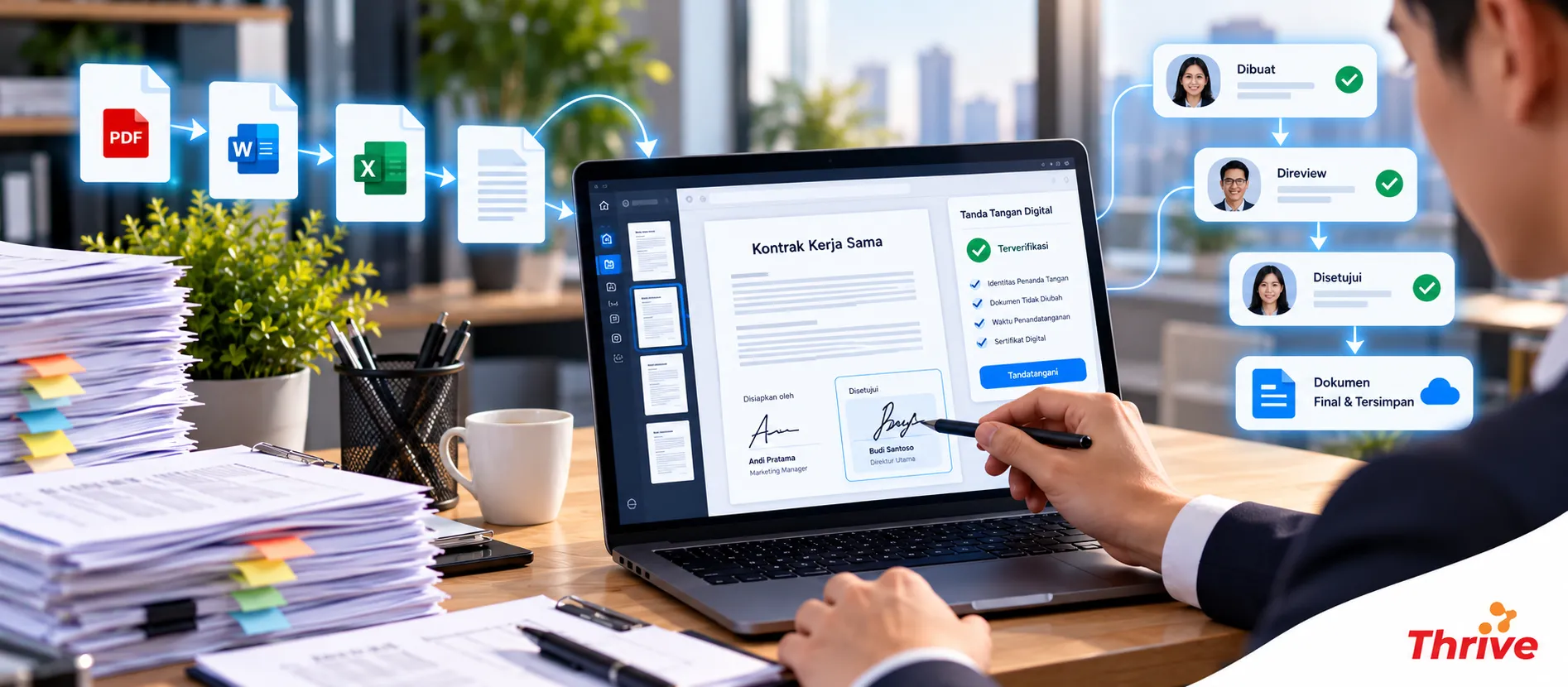
Digital signatures help companies speed up document approval processes, reduce reliance on paper, and simplify electronic document management. With the right solution, contract signing, procurement documents, and internal approvals can be more efficient. Companies still need to ensure security, signature validity, and compliance with applicable regulations.
Why is the Manual Signature Process a Challenge for Companies?
Manual signature processes can slow down document workflows because documents need to be printed, mailed, signed, and then returned to the relevant parties. The more people involved in approvals, the greater the likelihood of delays.
This problem often occurs in companies that manage customer contracts, work agreements, purchase orders (POs), vendor documents, and financial approvals.
To begin evaluating document support software options, companies can use the references Cari License Software.
What are the problems that arise from manual workflow?
Some common obstacles include:
Slow approval process:Documents awaiting signature from one or more parties.
Administration costs increased:Companies incur costs for printing, shipping, and storing physical documents.
Document status is difficult to monitor:The team needs to contact the relevant parties to find out the position of the document.
Risk of lost documents:Physical documents can get misplaced, damaged, or difficult to find.
Cross-location coordination becomes complicated:Parties in different offices must arrange deliveries or meetings.
The impact extends beyond administration. Delays in signing contracts can hinder the procurement process, slow down collaboration with customers, and delay project completion.
What Is a Digital Signature and How Does It Work?
A digital signature is an electronic signature mechanism based on cryptographic technology used to help verify the signer's identity and maintain the integrity of digital documents. This term should be distinguished from a more general electronic signature, such as an image of a signature affixed to a file.
In practice, a digital document signing solution can have a process like the following:
Documents prepared:Users upload or create documents to be signed.
The related parties are determined:The sender determines who needs to sign or approve the document.
Identity verified:The system executes authentication methods according to applicable features and policies.
Document signed:The signatory completes the process according to the mechanism provided.
Documents saved:Signed documents are managed as digital archives.
Each product has different features and mechanisms. Companies should determine whether the solution they choose offers traditional electronic signatures or certificate-based and cryptographic digital signatures.
To compare software options that support business needs, teams can access Cari License Softwareand verify the features of each product before purchasing.
How Does Digital Signature Help Corporate Document Workflow?
Digital signatures can help reduce manual steps in the signing process, especially when companies have numerous documents that require approval from multiple parties. The benefits are maximized when the solution is integrated with the company's work processes and document storage systems.
Here are the business benefits that can be targeted.
1. Speed up the approval process
Documents can be sent to signatories without the need for printing and physical delivery. This has the potential to expedite the approval of contracts, vendor documents, and internal documents.
2. Reduce administrative costs
Using digital documents can reduce the need for paper, printing, couriers, and physical storage space. Actual savings depend on the volume of documents and processes successfully transitioned to digital systems.
3. Increase visibility of document status
Some solutions provide status tracking, such as documents awaiting signature or completed processing. This information helps teams prioritize follow-up and reduce repetitive communication.
4. Supports document security and integrity
Cryptography-based digital signatures can help detect changes to documents after they've been signed. The level of security depends on the implementation, authentication method, key management, and access policy.
5. Supports digital archive management
Documents stored in a structured manner are easier to manage and retrieve if the system provides appropriate search and archiving functions.
Companies can assess these needs while exploring options through Cari License Software.
What are some examples of digital signature use in companies?
Digital signatures are relevant for companies that routinely require document approval or validation. Examples of their application vary depending on the department's function.
Human Resources:Employment agreements, onboarding documents, and internal letters.
Procurement:Procurement documents, vendor agreements, and purchase approval documents.
Finance:Certain approval documents, statements, and transaction documents as per company policy.
Sales:Customer contracts, service agreements, and cooperation documents.
Legal:Business agreements and documents that require a controlled signing process.
Management:Approval of internal policies and documents as authorized.
For example, a company that processes a large number of customer contracts can use a digital signature workflow to send documents to relevant parties in a more structured manner. The team then monitors the completion of the documents and stores the results according to archival policies.
For these needs, the company can review Cari License Softwareas an initial reference in product searches, then ensure feature support based on official specifications.
What to Consider When Choosing Digital Signature Software?
The right digital signature software must align with your company's workflow needs, security level, legal requirements, and budget. Don't just compare licensing prices without examining how each product works and its limitations.
Some important factors that need to be evaluated include:
Signature type:Make sure the signature type is appropriate to the needs and risk level of the document.
Identity verification:Check the authentication methods available to the signer.
Document integrity:Make sure the document change detection mechanism is well explained.
Audit trail:Check whether the system provides activity logs and processing times.
Integration:Evaluate compatibility with business applications and document storage used.
Access control:Ensure access rights, account management, and document storage comply with company policies.
Legal compliance:Check the solution's compliance with applicable regulations in Indonesia and the type of document to be signed.
Licensing models and fees:Take into account the number of users, document volume, additional costs, and technical support.
In Indonesia, electronic signatures and the implementation of electronic systems have legal requirements that must be adhered to. For documents with legal consequences or high risks, companies should consult with their legal team and review the applicable requirements.
The procurement team can initiate a search for alternatives through Cari License Software, then ask for confirmation regarding features, licensing schemes, and implementation support.
Is the Ultimate Toolkit Relevant for Digital Document Management?
Toolkit Ultimate can be considered as a software candidate when evaluating a company's document management needs. However, its specific capabilities for digital signatures, approval workflows, authentication, audit trails, and integration should be verified through the product's official documentation before being positioned as a solution that meets those needs.
Before selecting the Ultimate Toolkit, companies should ensure:
Does the product actually provide digital signature features or just another document processing function?
Does the feature match the type of signature required?
Is activity logging, authentication, and document management available?
What are the licensing terms, technical support, and product updates?
Can the product be integrated with existing workflows?
This evaluation step helps companies avoid mismatches between business needs and product capabilities. To find software and licensing references, use Cari License Software, then validate the specifications before making a decision.
How to Start Implementing Digital Signature?
Effective implementation should begin with the document processes that experience the most delays. Companies can conduct limited trials to assess the solution's impact before implementing it more widely.
Here are the steps you can take:
Map the current workflow:Identify documents, approving parties, and points of delay.
Determine priorities:Select documents that are suitable for transfer to digital process.
Define security and compliance needs:Define authentication methods, activity logging, and storage rules.
Compare products:Evaluate features, compatibility, support, and total cost.
Do a test run:Use documents that represent real business processes.
Measure results:Monitor turnaround times, administrative costs, number of pending documents, and error rates.
Expand the application:Apply to other departments if the trial results meet the target.
Companies can use Cari License Softwareas an initial reference when gathering software options to compare.
Conclusion
Manual signature processes can slow document approvals, increase administrative costs, and complicate status monitoring. Digital signatures can help companies build more efficient, structured, and secure document workflows, provided the solution aligns with business needs and legal requirements.
Before purchasing software, companies should map the processes they want to improve, test features in real workflows, and verify licensing schemes. Toolkit Ultimate can be included in the evaluation list once its specific capabilities are confirmed. To begin your search, visit Cari License Software.
If your company needs help evaluating software options, licensing, or document workflow implementation, the Thrive team can help discuss your needs accordingly.
FAQ: Digital Signature for Companies
1. What are the benefits of digital signatures for companies?
Digital signatures can help speed up document approval, reduce paper-based processes, improve traceability, and support document integrity checks according to the mechanism used.
2. What is the difference between a digital signature and an electronic signature?
An electronic signature is a general term for any electronic method of indicating approval or signing. Technically, a digital signature typically uses cryptography to help verify the signer and detect document alterations. The two are not always synonymous.
3. Are digital signatures legal to use in Indonesia?
Electronic signatures can be legally enforceable if they meet applicable regulations. Requirements depend on the type of signature, the process used, and the context of the document. Companies should review relevant regulations and consult with their legal team if necessary.
4. Can digital signatures speed up document workflow?
Yes, digital signatures can reduce printing, physical mailing, and manual coordination. The extent of the efficiency increase depends on the workflow, number of signatories, and system features implemented.
5. Does Toolkit Ultimate have a digital signature feature?
Toolkit Ultimate's digital signature features need to be confirmed through the official product specifications. Companies should verify signing support, authentication, audit trails, and licensing terms before purchasing.
Related Articles
Also read other interesting information from us

General
7 Reasons the Lenovo ThinkPad T470s Is Perfect for Office Work
Finding the right laptop for office work can be tricky. It needs to be lightweight, durable, and, of course, reliable fo...

General
Smart Steps to Increase Sales Through Your Own Website
Having your own website is a strategic step to increase business sales in the digital era. With the support Website...

General
The Software Testing Revolution with AI Automation: Can It Really Reduce Test Case Creation Time by Up to 35%?
Why is AI increasingly being used for software testing?AI Automationable to speed up test case creation by up to 35% by...
Get Free Consultation
Discuss your company's IT needs with our customer support right now at
+62 822 9998 8870


